Packing a camera safely in a backpack comes down to three things: the right bag, proper padding, and smart placement. Cushion the bottom with soft items or foam, place the camera body in the center surrounded by padding on all sides, and store every lens in its own dedicated pocket. Get those three things right and your gear will survive any journey.
- Improper packing causes over 40% of transit-related camera damage, according to 2026 photography insurance data.
- Cameras stored with at least 2 inches of closed-cell foam padding experience 78% fewer impact-related failures during transport.
- A dedicated camera backpack with adjustable foam dividers outperforms a standard bag in every protection metric.
- Memory cards, batteries, filters, and lens caps each need their own designated pocket — loose accessories in the main compartment are a damage risk.
Why Does Packing Your Camera Correctly Actually Matter?
Your camera is probably the most expensive and fragile item in your bag. A stumble on a trail, an overhead locker slam, or a bag knocked off a café table — any of these can crack a lens element, scratch a sensor, or shatter an LCD screen in a fraction of a second. Treating a camera like just another piece of kit is how photographers end up with expensive repair bills.
Photography insurance data from 2026 shows that improper packing is the single leading cause of transit-related camera damage, responsible for more than 40% of all claims filed. Camera body repairs typically run between $150 and $800 depending on the model and severity. Professional lens repairs can exceed $1,200 for high-quality glass. That makes a compelling argument for getting the packing system right before the trip begins, not after something breaks.
Physical impact isn’t the only threat. Water exposure, dust infiltration, and temperature-driven condensation all degrade camera electronics over time. Moving a cold camera body into a warm indoor environment causes moisture to form inside the lens — a form of damage that voids most manufacturer warranties and can go completely undetected until it causes a focus failure mid-shoot. Correct packing addresses all of these risks at once.
How Do You Choose the Right Backpack for a Camera?
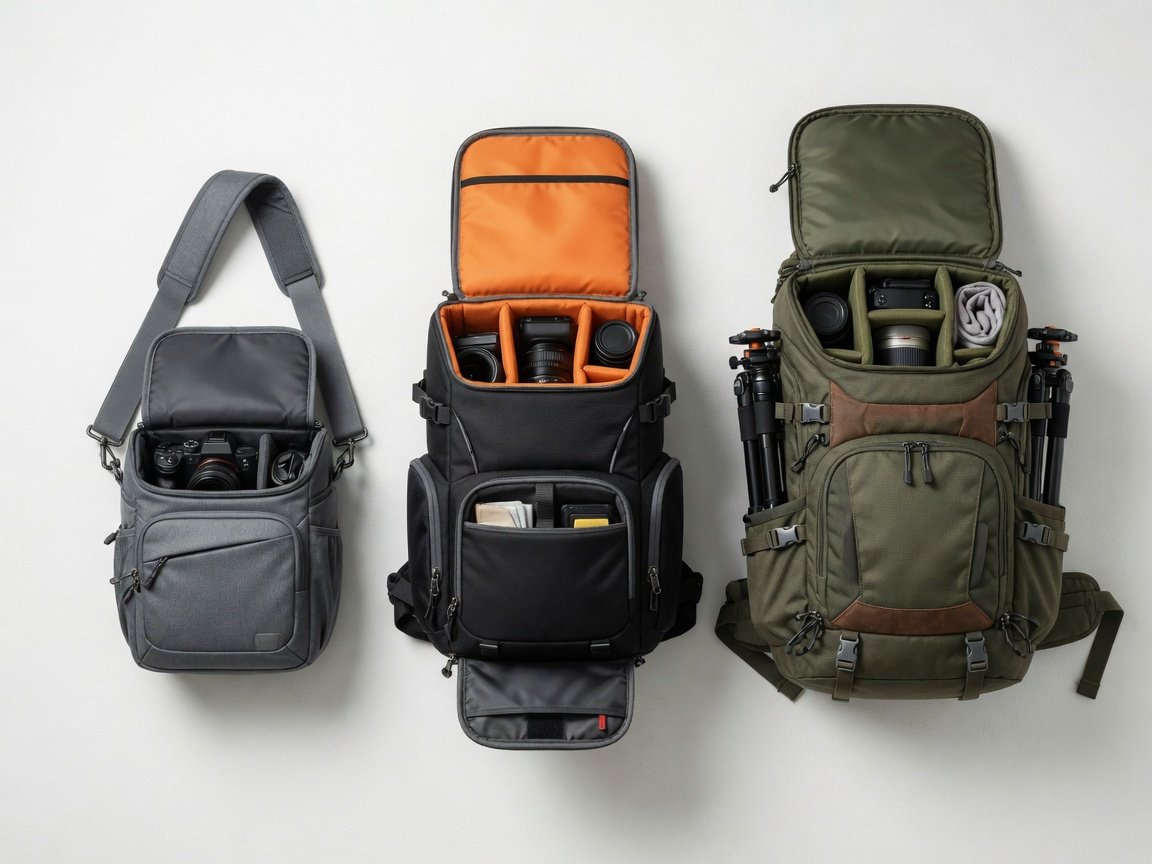
The bag you choose is the foundation of everything else in this guide. It determines how much padding is available, how accessible your gear is on the move, and how well protected everything stays throughout a full day out. Choosing the wrong bag means compensating for its limitations at every step of the packing process.
A 2026 survey of travel photographers found that 68% now carry a dedicated camera backpack rather than adapting a standard pack. The remaining 32% use hiking or travel bags with aftermarket padded inserts — a workable solution, but less effective than purpose-built construction. Standard school bags ranked last, with photographers reporting significantly higher rates of scratched gear and missing accessories.
If photography is the primary purpose of your outing, a purpose-built camera backpack gives you the strongest foundation. These bags are engineered from the inside out — foam-padded compartments, dedicated lens pockets, quick-access entry doors, and weatherproof shells are standard features rather than add-ons you have to buy separately.
Size matters too — and bigger is not always better. A bag with too much internal space lets gear shift and rattle freely during transit. A bag that’s too small forces you to overstuff, creating pressure on the camera body and lens mounts. Aim for a main compartment that fits your camera snugly with roughly two inches of clearance on all sides. For a full breakdown of options across every shooting setup, the essential camera backpack guide for photographers covers everything from compact mirrorless rigs to full DSLR systems with multiple lenses.
What Backpack Features Do You Actually Need?
Once you’ve settled on the right type of bag, focus on specific features. These are the ones that make a measurable difference in the field — not marketing copy, but functional elements that affect how well your gear survives a day out.
- Adjustable padded dividers: Fixed compartments rarely fit every gear configuration. Adjustable foam dividers let you build a custom internal layout around your exact kit — not a generic layout designed for someone else’s.
- Padded shoulder straps and a structured back panel: Ergonomics research shows that proper load distribution reduces perceived carrying effort by up to 35% compared to unbalanced or unpadded packing. Comfort matters on long shooting days.
- Built-in rain cover: Essential for outdoor work. Water damage accounts for roughly 22% of all camera warranty claims filed in 2025–2026 — most of them preventable.
- Quick-access side or base entry: Lets you retrieve the camera without removing the full bag. Invaluable when a shot is unfolding in front of you and every second counts.
- Lockable zippers: Anti-theft features matter in airports, markets, and crowded city streets where bag dipping is a real risk.
- External tripod attachment loops: Keeps a tripod accessible without consuming internal compartment space or unbalancing the bag’s weight distribution.
The global dedicated camera bag market reached an estimated $2.1 billion in 2025, growing at 11% year over year. That growth reflects what photographers keep learning the hard way: the right bag isn’t a luxury. It’s load-bearing protection insurance for a piece of gear you can’t afford to replace mid-trip.
How to Pack a Camera in a Backpack: Step by Step
Follow this exact process every time you pack. Consistency is what makes packing reliable — not doing it right once, but making it automatic before every departure so that nothing is ever left to chance.
- Check the bag is clean and dry. Shake out debris. Check every pocket for moisture. A damp interior creates condensation that damages electronics before you’ve even left home.
- Add a base padding layer. Place a folded microfibre cloth, a rolled fleece, or a foam pad at the very bottom of the main compartment. This is your first line of defence against drops.
- Place the camera body in the center. The geometric center of the bag is the safest position. It sits furthest from every external edge and absorbs the least shock in any impact direction.
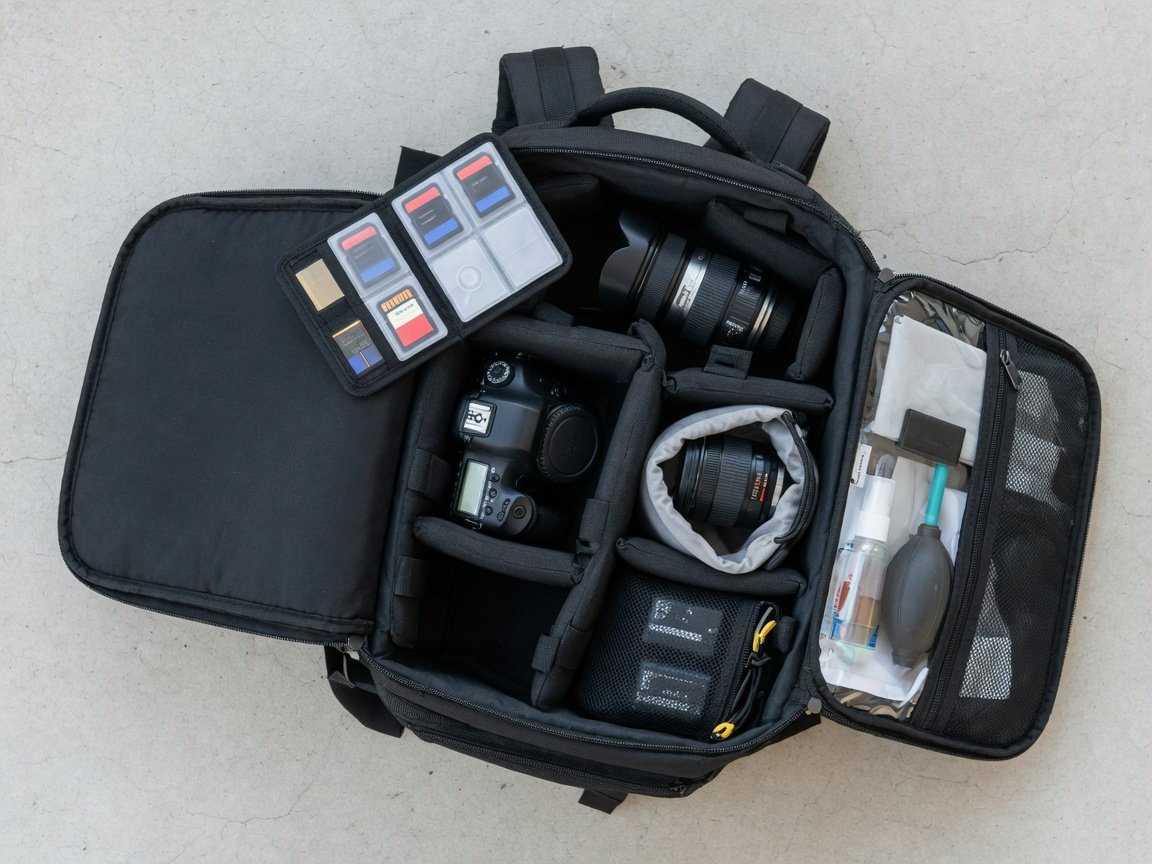
- Surround the camera body with padding. Use foam dividers or tightly rolled soft clothing on all sides. Aim for at least two inches of cushioning between the camera and the bag walls everywhere.
- Attach all lens caps and the body cap. Never pack with an exposed lens element or open sensor mount. Caps prevent scratches that often go unnoticed until you’re reviewing images at home.
- Pack each lens individually. Every lens goes into its own padded pocket or dedicated lens pouch. Never nest two lenses together without solid padding between them.
- Store small accessories in outer zippered pockets. Memory cards, spare batteries, filters, and cleaning tools belong in outer pockets — never loose in the main compartment where they migrate into the camera zone.
- Pack heavier items close to your back and low. Water bottles, heavy lenses, and a laptop sit against the back panel and low in the bag. Nothing heavy goes directly above the camera body.
- Seal every zipper fully. Check each compartment is closed before lifting the bag. An open zipper is the most common reason accessories end up on the ground.
- Run the shake test. Gently shake the packed bag before leaving. If anything moves or rattles, stop and add more padding before you go — not when you arrive.
| Step | Action | Why It Matters |
|---|---|---|
| 1 | Clean and dry the bag | Prevents moisture and debris damage to sensitive electronics |
| 2 | Add a base padding layer | Cushions against direct bottom-impact forces |
| 3 | Center the camera body | Maximises distance from every external impact edge |
| 4 | Add padding on all sides | Protects against impacts from any direction |
| 5 | Attach all caps | Shields glass elements and the sensor mount from scratches |
| 6 | Pack each lens separately | Eliminates glass-to-glass contact and surface scratching |
| 7 | Accessories to outer pockets | Keeps small items out of the padded camera zone |
| 8 | Heavy items low and back-facing | Maintains centre of gravity and protects the camera from above |
| 9 | Seal all zippers | Prevents accessories falling loose during transit |
| 10 | Shake test before departure | Final confirmation that nothing is loose or unsecured |
What’s the Best Way to Pad and Protect Your Camera?
The type of padding you choose matters as much as whether you use it at all. Different materials perform very differently under real impact conditions, and the wrong choice can give you a false sense of security without providing meaningful protection.
Closed-cell foam is the industry standard for good reason. It’s lightweight, firm, and doesn’t compress permanently over time the way softer open-cell foams do. Engineering tests show closed-cell foam reduces transmitted shock forces by up to 65% compared to soft fabric alone. Most quality camera bags use it in their divider systems — if yours doesn’t, aftermarket foam divider kits are widely available and fit most main compartments.
Bubble wrap is a practical emergency option. The sealed air pockets absorb sharp impact forces well and add a useful barrier around delicate optical glass. The downsides are bulk and heat retention — not ideal for daily use, but worth keeping a sheet in your kit for shipping or temporary storage when your usual bag isn’t available.
Clothing and soft fabric works well as a base or top layer. It compresses under sustained weight though, so it shouldn’t be your only protection layer. Use clothing alongside foam dividers rather than as a standalone substitute. The combination of firm foam for structure and soft fabric for fill is the most effective everyday setup.
For maximum protection on long journeys — flights, motorcycle trips, or extended off-road hiking — consider a rigid inner case with custom foam inserts placed inside the padded backpack. This dual-layer system combines the structural protection of a hard shell with the ergonomic comfort of a soft bag. It’s the setup professional photojournalists use on assignment in demanding environments where gear failure isn’t an option.
Where Should Camera Lenses Go in Your Backpack?
Lens placement generates genuine debate among photographers. Main compartment or side pockets? Glass-end up or glass-end down? The answer depends on your bag’s layout and how you work in the field — but there are clear principles that apply regardless of what bag you’re using.
If you use side accessory pockets, place lenses with the glass element facing down. This prevents any loosely fitted filter rings from working themselves off during transit. The pocket walls add a useful extra layer of fabric padding around the barrel. The trade-off is access — retrieving a lens from a side pocket while wearing a full pack is awkward, particularly in narrow spaces like aircraft aisles or crowded trails.
If you use the main compartment, build individual cells for each lens using adjustable padded dividers. This approach is more secure — items in the main compartment shift far less if the bag is accidentally inverted or dropped. It also keeps all your glass in one organized zone. The downside is reduced compartment space for the camera body itself, which is why divider configuration matters so much.
Photography surveys from 2026 show that 3 out of 4 photographers who experienced lens damage during travel were not using individual lens pouches at the time. A dedicated pouch for each lens costs very little and pays for itself the first time you drop the bag or travel on rough terrain where vibration is constant.
How Do You Organize Camera Accessories in a Backpack?
Small accessories create big problems when they’re disorganized. Loose batteries roll into the camera compartment. Memory cards slide to the bottom of pockets and vanish. Lens caps bounce around until they scratch whatever they land on. A deliberate organization system prevents all of this — and makes you faster in the field when a shot is happening.
- Memory cards: A dedicated card wallet with individual labeled slots keeps cards protected from static and physical damage. Always store used and unused cards in different slots so you know exactly what you have left.
- Batteries: Keep charged and depleted batteries in separate labeled pouches. Mixing them kills shoots early and wastes time you don’t have.
- Lens caps: A small drawstring pouch works well. Caps rolling freely in a main compartment scratch whatever they touch — including the camera body.
- Cleaning kit: Blower brush, sensor swabs, and a microfibre cloth belong in a zippered outer pocket for quick access without digging through the bag.
- Cables and chargers: Use a cable roll or organizer pouch. Tangled cables slow you down at the worst moments and create unnecessary bulk in tight pockets.
- Filters: Store in a hard filter case. Loose filters slide against each other and scratch optical coatings within minutes of movement.
A 2026 survey of travel photographers found that 72% rank organization as their top gear priority — rating it above weight reduction and even physical comfort. Good organization isn’t just about preventing damage. It’s about being ready to shoot when the moment appears, not missing it because you’re hunting for a lens cap at the bottom of a pocket.
How Do You Protect Your Camera From Rain and Moisture?
Weather doesn’t give advance notice. Even in dry climates, a sudden downpour or an accidental water spill can damage camera electronics within minutes. Building weather protection into your packing routine from the start means you’re never caught having to make rushed decisions in the rain.
Start with the bag’s outer shell. Many camera backpacks use a Durable Water Repellent (DWR) coating or ripstop nylon construction that resists light rain effectively. This slows water penetration but won’t withstand a sustained heavy downpour on its own — it buys you time, not complete protection.
The built-in rain cover is your primary line of defence. Most dedicated camera bags include one tucked into a base pocket. If yours doesn’t, a universal rain cover takes up almost no space and costs very little. The key habit is deploying it proactively — the moment clouds darken, not after the rain has started. Waiting until it’s raining means the bag exterior is already wet before the cover goes on.
For sensitive electronics like memory cards and spare batteries, a small waterproof zip-lock pouch inside an outer pocket adds a meaningful secondary moisture barrier. Water damage accounted for roughly 22% of all camera warranty claims filed in 2025–2026. The majority of those incidents were preventable with basic waterproofing steps that add less than a minute to the packing routine.
What Are the Best Camera Packing Tips for Hikers and Travelers?
Hiking and travel both add layers of complexity to camera packing. Movement is constant, conditions shift without warning, and you often can’t stop to reorganize once you’re on the trail or through airport security. The goal is a packing system that works without any adjustment from the moment you leave the door to the moment you arrive.
For hiking, weight distribution matters as much as protection. Heavier items — water bottles, thick lenses, a first aid kit — belong close to your back and positioned low in the bag. The camera body, being lighter, sits in the center of the main compartment. This positions your centre of gravity close to your spine and significantly improves balance on uneven terrain. The detailed breakdown in how to pack a hiking backpack for maximum comfort covers weight distribution principles in far more depth if you’re trying to optimize for both gear safety and all-day carrying comfort.
For travel, accessibility is the priority alongside protection. You need your camera reachable at airport security, ready on a city street, and secure in an overhead locker — all within the same journey. A bag with a dedicated camera compartment that opens from the base or side, separate from the main zipper, allows fast access without opening the entire pack. The roundup of the best travel backpacks for any journey covers options that balance camera protection with carry-on compliance across major international airlines.
For multi-day backpacking trips where camera gear shares space with camping equipment, the layering and weight challenge is more complex. The comprehensive guide on how to pack for a backpacking trip walks through the full system for mixing overnight gear with photography equipment without compromising either protection or pack balance.
What Camera Packing Mistakes Should You Avoid?
Even experienced photographers make these errors. Run through this checklist before any trip — especially the first time you use a new bag or pack a different camera configuration.
- Packing the camera loose in the main compartment. Without dividers, the camera body shifts and impacts everything around it on every step you take.
- Placing heavy items directly above the camera. A water bottle or laptop sitting above the camera multiplies any downward impact force directly onto the body and mounted lens.
- Skipping the shake test. If you can hear things moving inside the bag before you leave, the problem already exists — fix it before departure, not when something breaks.
- Two lenses sharing a pocket without individual padding. Unprotected lens elements touching each other during movement will scratch. No exceptions, no matter how short the journey.
- Overpacking the bag. A bag forced shut under pressure puts constant stress on everything inside it — including lens mounts, filter threads, and the camera body chassis.
- Leaving the rain cover at home. The one trip you decide not to bring it is statistically the one that sees unexpected rain.
- Packing with an exposed lens element or body mount. An uncapped rear lens element packed against fabric or another item will acquire scratches that don’t show up until you’re reviewing critical shots.
Photography surveys from 2025–2026 consistently show that 3 out of 4 photographers who experienced gear damage during travel say it happened in transit — not during active shooting. The journey itself doesn’t break the camera. The packing does.
Frequently Asked Questions
Can I pack a camera in a regular backpack?
Yes — with the right modifications. Use a padded camera insert or a foam divider kit to convert the main compartment into a camera-safe zone. Position the camera body in the center, pad all sides with at least two inches of cushioning, and follow the same 10-step routine. A regular backpack won’t have the purpose-built features of a dedicated camera bag, but proper padding compensates for most of the structural difference on short trips.
How do I stop my camera from getting scratched inside the bag?
Keep the camera in its own padded section, fully separated from everything else. Always attach the body cap when no lens is mounted, and keep all lens caps in place during transport. Use padded dividers rather than relying only on the bag’s soft lining. Avoid sharing the camera compartment with anything hard — a charger corner, a lens cap, or even a key can scratch a camera body finish within a single journey.
Should I remove the lens from the camera before packing?
For most day trips, leaving the lens attached is fine. It eliminates one connection point and reduces the risk of dust entering the sensor during a mid-trip lens change. For long-haul travel or extended backpacking under constant movement, detaching the lens reduces lever-arm stress on the mount — especially for heavier telephoto glass. If you detach, cap both the lens rear element and the camera body mount immediately and never pack either uncovered.
What’s the safest position for a camera body inside a backpack?
The geometric center of the main compartment, surrounded by padding on all sides. This position puts the camera furthest from every external edge. Any impact from dropping or knocking the bag must travel through two or more inches of foam before reaching the camera body. Avoid packing the camera against the base or the back panel — both are high-impact zones that receive the most shock in a typical drop scenario.
Can I carry a camera backpack as hand luggage on a flight?
Most dedicated camera backpacks in the 20–26-litre range comply with standard airline cabin bag dimensions. Always measure your specific bag against the airline’s stated limits before travelling — these vary between carriers and are sometimes enforced inconsistently at the gate. Camera equipment is almost always safer as hand luggage than checked baggage. Checked bags experience significantly more handling, vibration, and high-impact loading than bags that remain with you in the cabin.
How do I protect my camera from condensation in cold weather?
Leave the camera inside the closed bag for 20–30 minutes when moving from cold outdoor air into a warm interior. This allows gradual temperature acclimatisation rather than the sudden jump that causes moisture to form on and inside the optics. Silica gel packets placed inside the bag absorb residual moisture during storage and transit. This single habit prevents a form of sensor and lens damage that voids most manufacturer warranties and often goes undetected for weeks.
Do I need a special backpack just for carrying a camera while hiking?
Not necessarily. A quality hiking backpack with a padded camera insert works well for most shooting scenarios where the camera shares space with other gear. However, if photography is the primary purpose of the hike — not an add-on to it — a dedicated camera hiking pack gives you better internal organization, faster gear access without stopping, and built-in weather protection that standard hiking packs rarely match. The right choice depends on how much camera gear you carry and how often you need to access it on the move.
The Bottom Line: Build the Habit, Protect the Investment
Packing a camera correctly takes about three minutes the first few times. After consistent repetition, it becomes automatic — faster than throwing everything in and hoping nothing breaks. The photographers whose gear lasts a decade aren’t using better cameras than everyone else. They’re using better habits.
Here’s a practical sequence for getting started:
- This week: Audit your current bag. Does it have adjustable padded dividers? If not, order a foam divider insert or upgrade to a dedicated camera backpack before your next trip.
- Before your next trip: Run through the full 10-step packing routine from this guide. Do the shake test every time — make it non-negotiable.
- This month: Invest in individual lens pouches, a memory card wallet, and a small cable organizer. These small purchases eliminate your highest daily risk points for under $30 combined.
- Going forward: Develop a consistent pack order. Same position for the camera every single time. Habits take a few weeks to form and become permanent — the payoff is never having to think about it again before a trip.
Camera bag technology is also evolving fast in 2026 and into 2027. Magnetic quick-close divider systems are beginning to replace traditional hook-and-loop foam panels for faster internal reconfiguration. App-connected anti-theft zippers are entering the mainstream camera bag market. And fully modular outer shells — where one frame accepts interchangeable photography or hiking inner configurations — are making it easier than ever to convert a general travel pack into a capable camera carrier without buying an entirely new bag. These innovations will make the packing routine faster and more adaptable, but they won’t change the fundamentals: padding, placement, and consistency are what protect gear in 2026 and will continue to in 2027.
Your camera captures moments that can never be recreated. The bag system protecting it is worth getting right. With the correct backpack, proper padding, and a consistent packing routine, your gear can travel anywhere — mountain trails, international airports, crowded city streets, or remote river crossings — and arrive in exactly the condition it left in.